Cloud File Manager
Cloud File Manager is a web based file manager to manage your files and folders easily through a web browser.
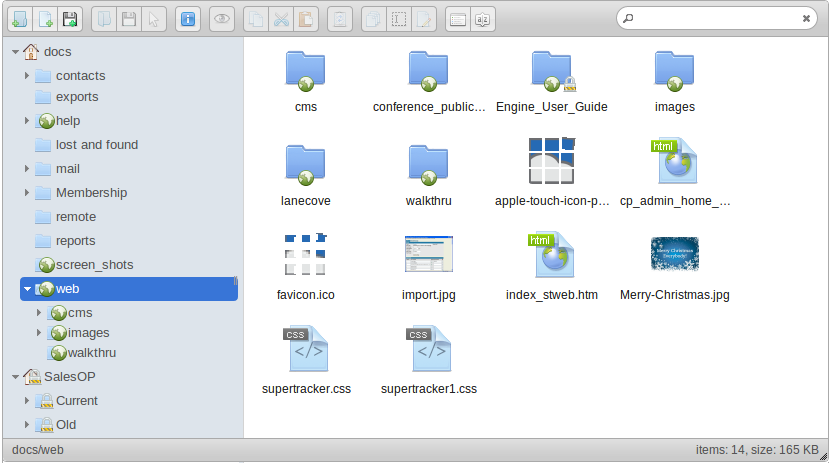

Cloud File Manager
The Cloud File Management (CloudFM) module provides a fast, accurate and secure way to manage and exchange business documents. Documents can also be managed in JobTrack via Web Folders - see below for more detail.
Documents can be attached to individual items within JobTrack such as Contacts or Tasks. They can also be added into the Document Manager and then linked to a relevant Contact, Task or other module item.
Features
-
- Ensure long-term readability by storing in native format
- Control access through security groups and rules
- Reflect traditional filing systems by organising into folders
- Version control functionality is built in to JobTrack
- Attach to the relevant source for example Customer, Job or Task
- Supports synchronized file stores to improve access from dispersed locations
About Cloud File Manager (CloudFM)
CloudFM is based on a hierarchical directory structure which uses AJAX to allow users to arrange files on the server in the same way they do with file managers on their personal systems. This ability to hierarchically arrange files improves the manageability of large collections of documents.
Features
-
- Application-like look and feel via AJAX
- Permissions by role and file uid
- Drag and drop moves of files and directories
- Attachment of files to multiple nodes and/or comments - location independence allows dir restructuring to have no affect on attachment functionality
- Drag and drop attachment ordering
- Single file upload with version options for file overwrite
- File delete/rename/view/download/add/permissions
- Secure file view/download
- Meta data editor (fixed fields at this time)
- File search
About Web Folders
Web Folders (or WebDav) is a way of editing files and folders from your computer on to a remote web server such as JobTrack without directly opening the site via your web browser.
The advantage of using Web Folders to manage your files and folders in JobTrack is that you can use the drag and drop method and organise files in your own familiar environment using Windows Explorer (for Windows users) or Finder (for Mac users).
Features
-
- Once files or folders have been edited from your computer and saved on the JobTrack server they can be seen by your authorised JobTrack users.
- You can conveniently save to your Web Folder from within other applications by selecting the Web Folder location when you save the file.
- Changes to files are automatically recorded in the Log tab so you can view previous versions of the files at any time.
- If you are copying large numbers of files to JobTrack the system will compare and only update those files that have changed. This smart copying feature saves unnecessary storage of the same file making better use of your data space.